Stress-test a shift schedule against demand
A schedule can meet the forecast and still leave a gap if demand rises. In this tutorial, solve one two-day schedule and evaluate the same assignments against a busier forecast. Install pyworkforce 0.6.0 or later with the plotting extra to run the full example.
Set staffing limits and solve once
The two shifts overlap in period 1. On day 0, require at least two people on the early shift and allow at most one on the late shift. On day 1, lock the two headcounts to reflect an existing commitment. Keys are (day, shift_name) and bounds are inclusive. A (0, 0) limit closes that shift for the day.
from pyworkforce.plotting import plot_coverage
from pyworkforce.scheduling import MinRequiredResources

base = [[2, 3, 1], [1, 2, 2]]
campaign = [[2, 3, 1], [2, 4, 2]]
scheduler = MinRequiredResources(
    num_days=2,
    periods=3,
    shifts_coverage={"early": [1, 1, 0], "late": [0, 1, 1]},
    required_resources=base,
    max_period_concurrency=3,
    max_shift_concurrency=3,
    shift_limits={
        (0, "early"): (2, 3),
        (0, "late"): (0, 1),
        (1, "early"): (1, 1),
        (1, "late"): (2, 2),
    },
    num_search_workers=1,
)

solution = scheduler.solve()
if solution["status"] not in {"OPTIMAL", "FEASIBLE"}:
    raise RuntimeError(solution["status"])

print(scheduler.scheduled_resources())
comparison = scheduler.compare_coverage({"base": None, "campaign": campaign})
print(comparison.to_string(index=False))

ax = plot_coverage(scheduler.coverage(campaign), day=1)
ax.set_title("Campaign forecast · day 1")
ax.figure.savefig("campaign-coverage.png", dpi=140)
Read the gaps before making changes
The base forecast is fully covered, with one surplus person-period. The campaign leaves two person-periods uncovered, one in each of the first two periods of day 1. A person-period counts one person for one interval. An agent working three intervals contributes three person-periods.
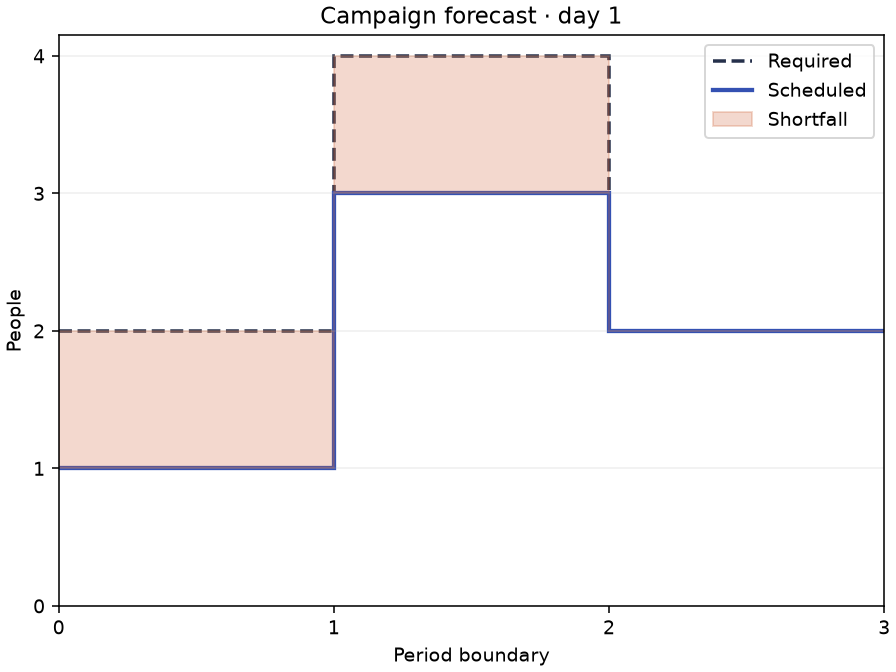
compare_coverage() evaluates the existing plan. To optimize for the campaign, solve a new scheduler with the campaign as required_resources. In this example, covering four people in period 1 requires raising the overall period cap and revisiting the locked shift counts. Use MinAbsDifference when a plan with explicit remaining shortfalls is acceptable.
To plan breaks separately, pass scheduler.scheduled_resources() to BreakScheduler as scheduled_resources. Check coverage against your chosen forecast before scheduling breaks.
Which interval needs extra people first?
In the development version, compare the campaign with a late rush using the schedule solved above. Both forecasts leave two person-periods uncovered.
from pyworkforce.plotting import plot_period_shortfalls

late_rush = [[2, 3, 1], [1, 2, 4]]
scenarios = {"Base": None, "Campaign": campaign, "Late rush": late_rush}
shortfalls = scheduler.compare_coverage(scenarios, by_period=True)
print(shortfalls.head(3).to_string())
ax = plot_period_shortfalls(shortfalls, limit=3)scenario Base Campaign Late rush
day period
1 2 0 0 2
0 0 1 0
1 0 1 0If the late rush materializes, move two people into the last interval of day 1. For the campaign, cover the first two intervals of that day with one extra person each. The base forecast needs no additional staff in any interval. The full table also includes the three fully covered intervals on day 0.
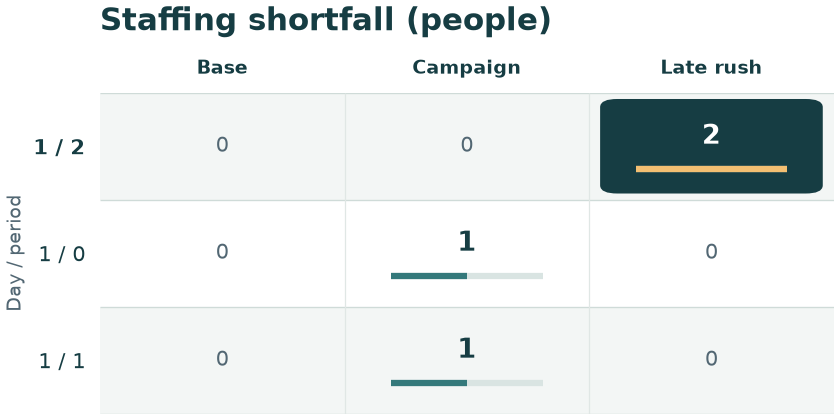
To reproduce the figure, run python examples/scheduling/prioritize_shortfalls.py from a development checkout installed with pip install -e ".[plot]".